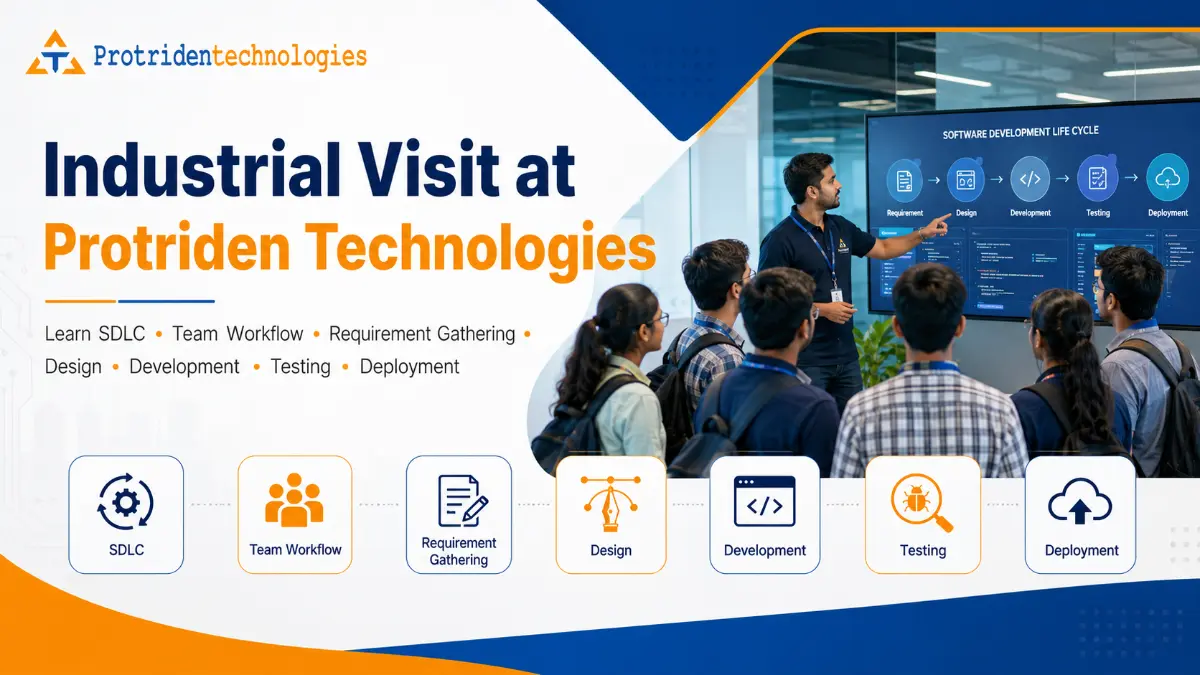
Industrial Visit at Protriden Technologies: Learn How a Real Software Company Works
For engineering students, BCA students, MCA students, computer science students, startup founders, and product-based companies, understanding how a software company works is very important.
Classroom learning gives theory.
An industrial visit shows reality.
Students may learn programming languages, databases, software engineering, cloud computing, testing, and project management in college. But many students still have one question:
How does a real IT company take an idea and turn it into a working software product?
That is exactly what an industrial visit at Protriden Technologies can help students and visitors understand.
Protriden Technologies is a software development company based in Kundapura, Udupi, Karnataka. The company works on website development, mobile app development, custom software, ERP/admin panels, cloud infrastructure, DevOps, cybersecurity, SEO, digital marketing, server cost optimization, and maintenance/support.
An industrial visit at Protriden Technologies is not only about seeing an office.
It is about understanding how real software projects move through planning, requirement gathering, design, development, testing, deployment, cloud setup, and post-launch support.
For engineering colleges, this kind of visit can help bridge the gap between academic learning and industry expectations.
For startup founders and product companies, it can help them understand what happens behind a professional software development project before they invest in building a website, mobile app, ERP, SaaS product, or custom platform.
Why Industrial Visits Are Important for Engineering Students
Many students complete their academic projects without understanding how software is built inside a company.
They may know programming syntax.
They may know database queries.
They may know basic project documentation.
But a real company environment teaches different lessons:
How requirements are collected
How teams divide work
How developers use version control
How UI/UX design is planned
How testing happens before launch
How bugs are reported and fixed
How cloud servers are configured
How staging and production environments are handled
How security is considered
How client communication works
How deadlines are managed
An industrial visit helps students see the connection between classroom subjects and real company work.
For example, when students learn Software Engineering, they study SDLC. But during an industrial visit, they can understand how SDLC is followed in real projects.
When students learn databases, they can understand how database structure affects software performance.
When students learn cloud computing, they can understand how applications are deployed and monitored.
When students learn testing, they can understand why QA is important before a product reaches users.
This practical exposure can make students more confident, more focused, and more career-ready.
What Students Can Learn During an Industrial Visit at Protriden Technologies
An industrial visit at Protriden Technologies can be structured to help students understand the complete software development journey.
The visit can cover:
How Protriden works as a software development company
How project ideas are converted into requirements
How the Software Development Life Cycle is followed
How teams work together
How UI/UX, frontend, backend, QA, cloud, and DevOps are connected
How development, staging, pre-production, and production environments are managed
How real-time projects are delivered
How students can prepare for IT careers
This helps students understand that software development is not only coding.
It is a complete process.
How Protriden Technologies Works
Protriden Technologies works as a practical software development partner for startups, SMEs, local businesses, and product companies.
The company focuses on turning business ideas and manual operations into secure, scalable digital systems.
The work usually starts with understanding the business problem.
For example:
A startup may need an MVP app.
A local business may need a website and local SEO.
An SME may need ERP or admin panel software.
A SaaS company may need cloud and DevOps support.
A business may need cybersecurity or server hardening.
After understanding the requirement, the team plans the right solution.
This may include:
Website
Mobile app
Web application
Backend system
Admin panel
ERP system
Cloud setup
DevOps pipeline
Testing process
Security review
Maintenance plan
For students, this is an important lesson.
A software company does not start by writing code immediately.
A good software company starts by understanding the problem.
What Is SDLC?
SDLC stands for Software Development Life Cycle.
It is the step-by-step process used to plan, build, test, deploy, and maintain software.
A practical SDLC usually includes:
Requirement gathering
Analysis
Planning
Design
Development
Testing
Deployment
Maintenance
In real software companies, SDLC may be followed in different ways depending on the project.
Some projects follow Agile methods.
Some projects follow milestone-based delivery.
Some projects use sprint planning.
Some projects use phased development.
But the basic goal is the same:
Build software in a structured, reliable, and maintainable way.
NIST notes that many SDLC models do not explicitly address security in detail, so secure software development practices should be added into SDLC implementation to improve software security.
This is an important lesson for students and startups.
A project should not be judged only by whether it works today.
It should also be judged by whether it is secure, scalable, testable, and maintainable.
Step 1: Requirement Gathering
Requirement gathering is the first and one of the most important stages of software development.
This is where the team understands what the client actually needs.
In this stage, the team may ask:
What problem should the software solve?
Who will use the system?
What are the main features?
What is the business goal?
What is the current manual process?
What data should be stored?
What reports are needed?
Who will manage the admin panel?
What are the user roles?
What is the expected launch timeline?
What is the budget range?
What integrations are required?
For students, this stage teaches that software development is not only about technical skills.
It also needs communication, listening, documentation, business understanding, and problem-solving.
For startup founders and product companies, requirement gathering helps avoid confusion later.
A clear requirement reduces rework, delays, cost changes, and missed expectations.
Step 2: Analysis and Planning
After collecting requirements, the team analyzes the scope.
This stage helps decide what should be built first and what can be added later.
For example, a startup may want a full mobile app with many features. But the development team may suggest starting with an MVP.
An MVP means Minimum Viable Product.
It includes only the most important features needed to launch, test the idea, and collect user feedback.
During planning, the team may decide:
Feature list
User roles
Project modules
Timeline
Technology stack
Database approach
Admin panel scope
Cloud requirements
Testing strategy
Deployment flow
Maintenance approach
This stage is important because poor planning creates technical debt.
Good planning gives the project a strong foundation.
Step 3: UI/UX and Design
Design is not only about making screens attractive.
Design is about making the product easy to use.
During the design stage, the team may create:
User flow
Wireframes
Screen layouts
Navigation structure
Dashboard layout
Mobile app screens
Website sections
Admin panel screens
Form layouts
CTA placement
For students, this stage shows why user experience matters.
A technically correct application may still fail if users cannot understand it.
For business owners, design affects trust, usability, conversion, and customer experience.
A good design should answer:
Can the user complete the main action easily?
Is the interface simple?
Are buttons clear?
Are forms short?
Can the business team manage data easily?
Is the admin panel understandable?
This is why design should be part of SDLC and not an afterthought.
Step 4: Development
Development is the stage where the software is actually built.
This can include:
Frontend development
Backend development
Mobile app development
Database development
API development
Admin panel development
Third-party integrations
Payment gateway integration
Cloud setup
Authentication and authorization
Reports and dashboard development
At Protriden Technologies, the service capability includes responsive websites, custom web applications, ecommerce platforms, hybrid/cross-platform mobile apps, ERP systems, admin panels, dashboards, cloud infrastructure, DevOps, and cybersecurity support.
For students, this stage helps them understand how different technologies work together.
A mobile app is not only the app screen.
It may need a backend.
It may need APIs.
It may need a database.
It may need an admin panel.
It may need cloud storage.
It may need deployment pipelines.
It may need monitoring and maintenance.
This helps students understand full-stack thinking.
Step 5: Testing and Quality Assurance
Testing is one of the most important stages of SDLC.
A feature should not be considered complete only because the developer says it works.
It must be tested.
Testing may include:
Functional testing
UI testing
Mobile testing
Web testing
API testing
Database testing
Form testing
Payment testing
Role-based access testing
Regression testing
Security testing basics
Performance testing basics
Bug reporting
For students, testing teaches patience and attention to detail.
For startups, testing protects user experience.
For SaaS companies, testing protects customer trust.
Testing helps find issues before users face them.
A good QA process checks not only the happy path but also edge cases.
For example:
What happens if payment fails?
What happens if internet disconnects?
What happens if wrong data is submitted?
What happens if a normal user tries to access admin data?
What happens if a file upload is too large?
This is why QA is an important role in every serious software company.
Step 6: Deployment
Deployment means making the software available for users.
Deployment may happen on:
Web hosting
Cloud servers
App stores
Internal company servers
Kubernetes clusters
Cloud infrastructure
Production environment
Deployment is not only uploading files.
It may include:
Server setup
Domain configuration
SSL setup
Database migration
Environment configuration
Build generation
Release approval
Backup setup
Monitoring setup
Error tracking
Rollback planning
Protriden’s DevOps and cloud service positioning includes hosting setup, server configuration, backups, monitoring, scaling, security hardening, Docker, Kubernetes, Jenkins, CI/CD pipelines, deployment automation, and infrastructure monitoring.
For students, this stage is very useful because many academic projects end after local development.
But real software must run on a server.
It must be available to users.
It must be monitored.
It must be maintained.
That is the difference between a college project and a production application.
Understanding Software Environments
One of the most important things students and startups should understand is how software environments work.
A serious software company does not directly test everything on production.
Different environments help teams build and release safely.
Development Environment
The development environment is where developers write and test code during active development.
This environment may run on local machines or internal servers.
It is used for:
Writing code
Trying new features
Fixing bugs
Testing small changes
Connecting to development databases
Running early builds
This environment can change frequently.
It is not used by real customers.
Staging Environment
The staging environment is closer to the real application.
It is used to test features before they go live.
Staging helps the team verify:
User flow
API behavior
Frontend-backend integration
Database changes
Payment test mode
Admin panel flow
Bug fixes
Regression issues
For clients or internal reviewers, staging is often where they can check the application before final approval.
Pre-Production Environment
Pre-production is used by some teams as the final verification environment before production.
It should be very close to the production setup.
It may be used for:
Final release testing
Performance checks
Deployment rehearsal
Security checks
Data migration testing
Rollback planning
Client sign-off
Not every small project may need a separate pre-production environment, but for serious SaaS, enterprise, or high-impact applications, it can reduce deployment risk.
Production Environment
Production is the live environment.
This is where real users access the software.
Production must be handled carefully because mistakes can affect customers, business operations, payments, and trust.
Production requires:
Stable code
Secure access
Backups
Monitoring
Error tracking
Role-based access
Deployment approval
Rollback plan
Performance monitoring
Security updates
For students, understanding production is important.
A project is not truly complete when it runs on a laptop.
A project becomes real when it works reliably for actual users.
How Teams Work in a Software Company
A software company works through collaboration.
Different people handle different responsibilities.
A typical software project may involve:
Business analyst
Project coordinator
UI/UX designer
Frontend developer
Backend developer
Mobile app developer
QA tester
DevOps engineer
Cloud engineer
Security reviewer
Client or product owner
Every role matters.
A developer may build features.
A tester finds issues.
A designer improves usability.
A DevOps engineer handles deployment.
A project coordinator tracks progress.
A product owner gives business direction.
This helps students understand that IT companies are team-driven, not individual-driven.
Even if one person writes code, successful software delivery depends on communication across multiple roles.
What Engineering Students Should Observe During the Visit
Students attending an industrial visit should observe more than tools and screens.
They should pay attention to:
How requirements are discussed
How teams communicate
How tasks are divided
How developers think about problems
How testing is done
How bugs are documented
How deployment is planned
How production is protected
How client expectations are handled
How software is maintained after launch
Students should also ask questions.
Good questions include:
How do you collect requirements from clients?
How do you decide technology stack?
How do you manage source code?
How do you test before launch?
How do you handle production bugs?
How do you manage staging and production?
How do you secure admin panels?
How do you estimate project timelines?
How do students prepare for software jobs?
These questions can turn an industrial visit into a strong learning experience.
Why Industrial Visits Help Colleges
Engineering colleges want students to become industry-ready.
But industry readiness requires exposure to real work.
An industrial visit can help colleges:
Connect classroom concepts with real projects
Improve student awareness of IT company workflow
Help students understand SDLC practically
Introduce students to software roles beyond coding
Create interest in internships and projects
Encourage industry-academia collaboration
Support placement readiness
Build relationships with local technology companies
For colleges in Udupi, Kundapura, Mangalore, Manipal, and nearby Karnataka regions, Protriden Technologies can be a practical local industry exposure partner.
Colleges can connect with Protriden Technologies for industrial visit discussions, student awareness sessions, internships, project guidance, and possible MOU discussions.
Why Startups and Product Companies Can Also Benefit
This blog is not only useful for students.
Startup founders, product companies, and B2B SaaS teams can also learn from the industrial visit approach.
Many founders want to build software but do not understand what happens behind development.
They may think software development means only coding.
But a real product needs:
Requirement clarity
MVP planning
UI/UX design
Frontend and backend development
Admin panel
Testing
Cloud setup
Staging environment
Production deployment
Security
Monitoring
Maintenance
Understanding this process helps founders plan better budgets, timelines, and expectations.
For product-based companies, understanding SDLC and environments helps improve collaboration with technology partners.
What Makes Protriden Technologies a Useful Industrial Visit Destination?
Protriden Technologies works across multiple areas of software delivery.
Students and visitors can understand how different services connect together:
Website development
Mobile app development
Custom software development
ERP and admin panels
Cloud infrastructure
DevOps
Cybersecurity
SEO and digital marketing
Maintenance and support
The company has experience across industries such as cab booking, ecommerce, blockchain, healthcare, pet care, logistics, e-waste management, tourist guide, import/export, education, bulk SMS, and cloud services.
This variety helps students understand that software development is used in many industries.
A software company does not build the same type of product every time.
Every project has a different problem, different users, different workflows, and different technical needs.
That is what makes real-world learning valuable.
Industrial Visit Session Structure
A practical industrial visit session at Protriden Technologies can be structured like this:
Welcome and company introduction
Overview of Protriden services
Introduction to SDLC
Requirement gathering explanation
UI/UX and design workflow
Development workflow
Testing and QA explanation
DevOps and deployment explanation
Environment explanation: development, staging, pre-production, production
Career guidance for students
Q&A with team members
Internship or collaboration discussion
This structure gives students both technical and career understanding.
For colleges, it creates a meaningful learning session rather than only a company tour.
Student Learning Outcomes
After attending an industrial visit at Protriden Technologies, students should ideally understand:
How a software company works
What SDLC means in real projects
Why requirement gathering is important
How design affects usability
How development teams divide work
Why testing is necessary
How deployment works
What development, staging, pre-production, and production environments mean
Why DevOps and cloud are important
How students can prepare for IT careers
Why communication and teamwork matter
This makes the visit valuable for engineering students, BCA students, MCA students, computer science students, and students planning IT careers.
Final Thoughts
An industrial visit is more than a one-day activity.
It can become a turning point for students who want to understand the IT field seriously.
It helps students move beyond theory and see how real software companies work.
At Protriden Technologies, students can learn how ideas become digital products through requirement gathering, design, development, testing, deployment, cloud setup, and maintenance.
For engineering colleges, this can support practical learning and industry exposure.
For startups and product companies, it can help them understand what a professional development process looks like before starting a software project.
If your college, student group, startup, or product team wants to understand how real software development works, Protriden Technologies can be a practical place to begin.
7. FAQs
1. What is an industrial visit at Protriden Technologies?
An industrial visit at Protriden Technologies is a learning visit where students or visitors can understand how a software company works, how SDLC is followed, how teams collaborate, and how software projects move from requirements to deployment.
2. Who can attend an industrial visit at Protriden Technologies?
Engineering students, BCA students, MCA students, computer science students, startup founders, product-based teams, and colleges looking for industry exposure can connect with Protriden Technologies for industrial visit discussions.
3. What will students learn during the visit?
Students can learn about requirement gathering, design, development, testing, deployment, development/staging/pre-production/production environments, team workflow, DevOps, cloud infrastructure, and career preparation.
4. Why is SDLC important for students?
SDLC helps students understand how software is developed in a structured way. It shows that real projects need planning, design, coding, testing, deployment, maintenance, and security considerations.
5. What is requirement gathering in software development?
Requirement gathering is the process of understanding the client’s business problem, users, features, workflows, reports, admin needs, integrations, timeline, and expected outcome before development starts.
6. What is the difference between development, staging, pre-production, and production environments?
Development is used by developers to build features. Staging is used to test features before release. Pre-production is used for final release validation. Production is the live environment used by real customers.
7. Can colleges contact Protriden Technologies for industrial visits?
Yes. Engineering colleges, BCA/MCA departments, and computer science departments can contact Protriden Technologies for industrial visit discussions, student awareness sessions, internships, and possible collaboration opportunities.
8. Is an industrial visit useful for startup founders?
Yes. Startup founders can understand the full software development process, including MVP planning, design, development, admin panel, backend, testing, cloud setup, deployment, and maintenance.
9. Does Protriden Technologies provide internship opportunities?
Protriden Technologies can be positioned for internship and student exposure discussions. Colleges and students can contact the team to understand current availability, domains, selection process, and batch planning.
10. Where is Protriden Technologies located?
Protriden Technologies is located in Kundapura, Udupi, Karnataka, and works with startups, businesses, SMEs, and product companies across different technology areas.
Plan an Industrial Visit at Protriden Technologies
Are you an engineering college, BCA/MCA department, student group, startup founder, or product team looking to understand how a real software company works?
Protriden Technologies can help students and visitors understand:
Requirement gathering
SDLC process
UI/UX design
Development workflow
Testing and QA
Cloud and DevOps
Development, staging, pre-production, and production environments
Real software project workflow
Career and internship direction
Contact Protriden Technologies to discuss an industrial visit, student session, internship awareness program, or college collaboration.