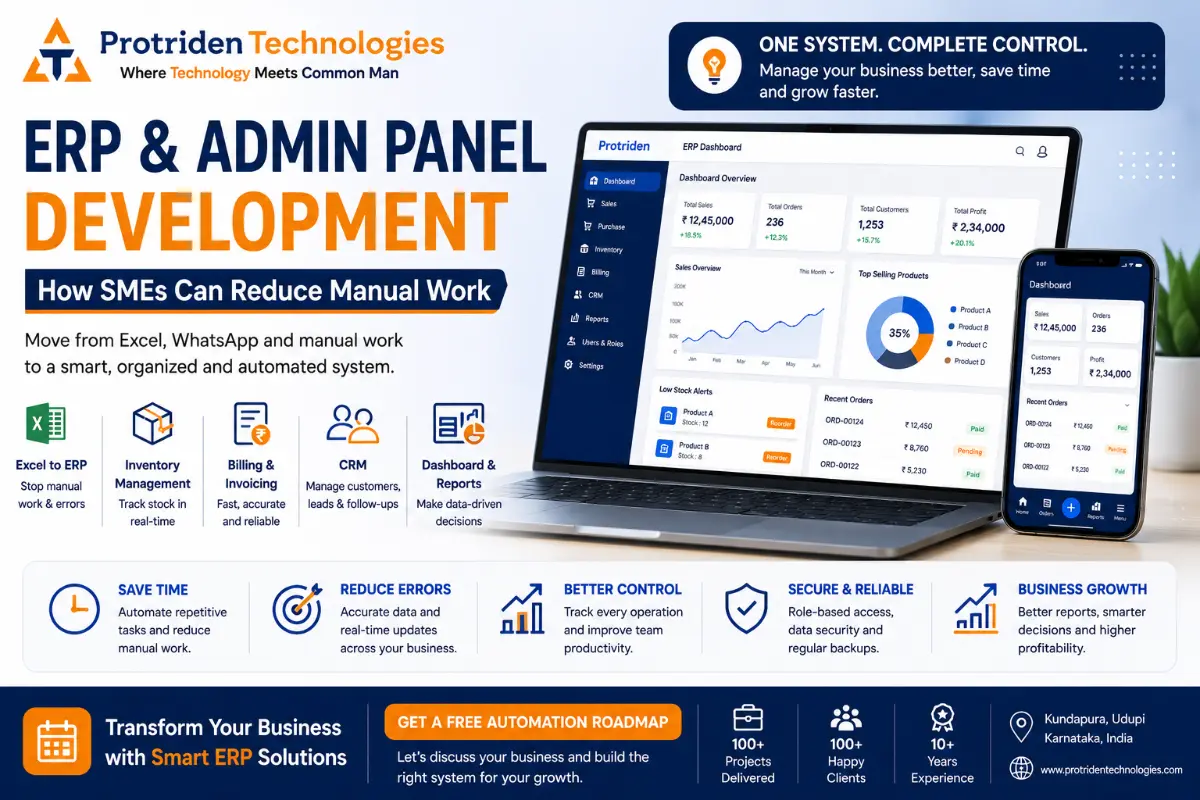
ERP and Admin Panel Development: How SMEs Can Reduce Manual Work
Many growing businesses start with Excel, WhatsApp, notebooks and manual billing.
In the beginning, this may work.
- Orders are few.
- Customers are limited.
- Inventory is manageable.
- Reports can be prepared manually.
- The owner knows what is happening every day.
But as the business grows, the same manual system starts creating problems.
- Orders get missed.
- Stock details are not clear.
- Billing takes more time.
- Customer follow-ups are forgotten.
- Staff updates are scattered.
- Reports are prepared late.
The business owner depends on calls and manual checking for every small update.
This is where ERP and admin panel development becomes useful.
An ERP system or custom admin panel helps businesses bring daily operations into one organized digital system.
For startups, SMEs, local businesses and growing companies, this can reduce manual work, improve control and make decision-making easier.
What Is ERP Software?
ERP stands for Enterprise Resource Planning.
In simple words, ERP software helps a business manage different operations from one system.
Instead of using separate Excel sheets, notebooks and WhatsApp messages, an ERP system can bring important business data into one platform.
ERP software can help manage:
- Inventory
- Billing
- Sales
- Purchases
- Customers
- Staff tasks
- Reports
- Payments
- Vendors
- Branches
- Approvals
- Daily workflows
For SMEs, ERP does not always need to be very complex.
A practical ERP can start with the most important business modules and grow step by step.
For example, a small business may first need billing, inventory and customer management.
Later, it can add staff management, purchase tracking, reports, branch management and automation.
What Is an Admin Panel?
An admin panel is the backend control system of a website, mobile app, ecommerce platform or business software.
If customers use your website or app, your team needs a place to manage everything behind it.
That place is the admin panel.
An admin panel can help your team manage:
- Users
- Products
- Orders
- Bookings
- Payments
- Customers
- Services
- Staff access
- Notifications
- Content
- Reports
- Support requests
For example, if your business has a service booking app, the admin panel helps you manage bookings, assign staff, update status, track payments and view reports.
Without an admin panel, your business may have an app or website but no proper control over operations.
ERP vs Admin Panel: What Is the Difference?
ERP and admin panel are connected, but they are not exactly the same.
An ERP system usually manages internal business operations such as inventory, billing, CRM, purchases, reports and workflows.
An admin panel usually manages the backend of a website, mobile app or web application.
For many businesses, both can work together.
For example:
A retail business may need ERP for inventory and billing.
An ecommerce business may need an admin panel for products, orders and customers.
A service business may need an admin panel for bookings and staff assignment.
A growing SME may need a custom ERP with dashboard, CRM, billing, inventory and role-based access.
The right choice depends on the business problem.
Why Excel Is Not Enough When Your Business Grows
Excel is useful.
It is simple, familiar and flexible.
But Excel becomes risky when too many people, too many transactions and too many workflows are involved.
Common Excel problems include:
- Multiple versions of the same file
- Manual data entry errors
- No real-time updates
- No role-based access
- Difficult reporting
- Poor data security
- No automatic alerts
- No approval workflow
- No customer history
- No inventory control
- No integration with billing or payments
For a small team, Excel may be enough.
For a growing business, Excel can slow down operations.
The problem is not Excel itself.
The problem is using Excel for tasks that need automation, access control, reporting and real-time visibility.
Signs Your Business Should Move from Excel to ERP
Your business may need ERP or admin panel development if you face these problems:
You do not know current stock clearly.
You prepare reports manually every day or week.
Your team repeats the same data entry multiple times.
Customers call repeatedly for order or service status.
Billing and inventory are not connected.
Sales data is scattered across different files.
Staff updates happen only through phone or WhatsApp.
Business owner needs to call multiple people to know daily status.
You cannot easily track pending payments.
You do not know which customer, product or service is performing well.
If these problems are happening regularly, your business may not need more Excel sheets.
It may need a proper digital system.
How ERP Software Helps SMEs Reduce Manual Work
ERP software helps SMEs reduce manual work by connecting daily operations.
Instead of entering the same data in multiple places, the data can move through the system automatically.
For example:
When a sale is created, stock can reduce automatically.
When an order is placed, the admin can see it immediately.
When a payment is pending, the system can show it in reports.
When staff updates a task, the owner can track progress.
When inventory is low, the system can show alerts.
When a customer is added, follow-ups can be tracked.
This reduces dependency on memory, repeated calls and manual checking.
A good ERP system can help SMEs:
- Save time
- Reduce errors
- Improve reporting
- Track business performance
- Improve customer service
- Manage staff better
- Control inventory
- Simplify billing
- Improve decision-making
- Reduce dependency on scattered tools
ERP is not only software.
It is a better way to organize business operations.
Inventory Management in ERP
Inventory is one of the most common problems for growing businesses.
Many businesses do not know exact stock levels until someone checks manually.
This creates issues like:
- Stock mismatch
- Overstocking
- Out-of-stock products
- Delayed orders
- Wrong billing
- Purchase confusion
- Manual counting errors
An inventory management module can help track:
- Product list
- Current stock
- Stock in
- Stock out
- Low stock alerts
- Purchase entries
- Sales entries
- Warehouse or branch stock
- Product categories
- Supplier details
- Stock reports
For ecommerce, retail, manufacturing, distribution, service parts and wholesale businesses, inventory management can save time and reduce confusion.
Billing Software Development
Billing is another important area where automation helps.
Manual billing or disconnected billing systems can create problems in reporting, tax calculation, payment tracking and customer history.
A custom billing system can help manage:
- Invoices
- Quotations
- Tax details
- Payment status
- Customer billing history
- Product or service pricing
- Discounts
- Receipts
- Pending payments
- Branch-wise billing
- Reports
A billing system becomes more powerful when it connects with inventory, CRM and reports.
For example, once an invoice is created, inventory can reduce automatically and customer payment status can update in the dashboard.
This helps the business owner see financial activity more clearly.
CRM for Customer Management
CRM stands for Customer Relationship Management.
A CRM helps businesses manage customer information and follow-ups.
Many businesses lose leads because customer data is scattered across phones, WhatsApp, notebooks and Excel.
A CRM can help track:
- Customer details
- Enquiries
- Follow-ups
- Sales status
- Call notes
- Quotation status
- Lead source
- Assigned staff
- Customer history
- Support requests
For businesses that depend on enquiries, sales calls, service follow-ups or repeat customers, CRM can improve conversion and customer experience.
A simple CRM can help your team answer:
- Who contacted us?
- What do they need?
- Who is following up?
- What is the next action?
- Which leads are pending?
- Which leads converted?
- Which marketing channel is working?
This gives clarity to the owner and accountability to the team.
Dashboard Development for Business Owners
A dashboard gives the business owner a clear view of important business numbers.
Instead of waiting for manual reports, the owner can see key information in one place.
A dashboard can show:
- Today’s sales
- Monthly sales
- Pending orders
- Pending payments
- Inventory status
- Customer enquiries
- Staff tasks
- Service status
- Branch-wise performance
- Top products
- Low stock items
- Revenue summary
- Lead status
Dashboards help business owners make faster decisions.
But a dashboard should not show too much unnecessary data.
It should show the numbers that actually matter for the business.
A good dashboard is simple, useful and action-oriented.
Role-Based Access in ERP and Admin Panels
Not every employee should see everything.
A good ERP or admin panel should have role-based access.
For example:
Admin can manage everything.
Manager can see reports and approve tasks.
Sales team can manage leads and customers.
Billing team can create invoices.
Inventory team can update stock.
Support team can handle customer issues.
This improves security and control.
Role-based access helps businesses avoid confusion, data misuse and accidental changes.
How ERP Supports Business Automation
ERP can automate repetitive tasks.
Automation does not mean replacing people.
It means reducing repeated manual work so your team can focus on better work.
ERP automation can include:
- Auto stock update after billing
- Low stock alerts
- Pending payment reminders
- Order status updates
- Task assignment
- Approval workflows
- Customer follow-up reminders
- Report generation
- Role-based notifications
- Invoice generation
- Lead tracking
Automation helps the business run with more structure.
For growing companies, this can reduce dependency on one person knowing everything.
How ERP Helps Startups and New Business Owners
Startups and new business owners often think ERP is only for large companies.
That is not always true.
A startup may need ERP-like systems if it has operations to manage.
For example:
A delivery startup needs order and delivery tracking.
A service startup needs booking and staff assignment.
An ecommerce startup needs product, order and inventory management.
A SaaS startup needs user and subscription management.
A local business going digital needs enquiries, billing and customer tracking.
The ERP does not need to be big from day one.
It can start as a simple admin panel or dashboard and grow as the business grows.
How ERP Supports Existing Businesses Going Digital
Many existing businesses want online presence and digital marketing.
But digital marketing alone is not enough if internal operations are manual.
For example, if marketing generates more enquiries, but the team cannot track follow-ups, leads may be lost.
If ecommerce brings more orders, but inventory is not updated, customers may face delays.
If a website brings service requests, but there is no dashboard, staff may miss tasks.
This is why businesses should connect digital marketing with internal systems.
A website brings enquiries.
A CRM tracks leads.
An ERP manages operations.
A dashboard gives visibility.
Together, these systems help the business grow in an organized way.
Common Mistakes Businesses Make Before ERP Development
Mistake 1: Trying to Build Everything at Once
Many businesses want every feature in the first version. This increases cost, timeline and confusion. Start with the most painful workflow first.
For example, begin with billing and inventory, then add CRM, reports and automation.
Mistake 2: Not Defining the Process Clearly
ERP development needs process clarity. Before development, document how your business currently works. Include who does what, what data is needed, what reports are required and where delays happen.
Mistake 3: Ignoring User Roles
If access levels are not planned, the system can become risky. Decide what each team member should see and manage.
Mistake 4: No Reporting Plan
ERP without useful reports is incomplete. Before development, define the reports the business owner needs.
Mistake 5: Copying Another Company’s ERP
Every business has a different workflow. Do not copy another company’s system blindly. Build based on your actual process.
Mistake 6: No Training for Team
Even a good system can fail if the team does not know how to use it. Plan basic training and adoption support.
Mistake 7: No Maintenance Plan
ERP needs updates, bug fixes, user feedback, security improvements and feature changes. Discuss maintenance from the beginning.
ERP Development Checklist for SMEs
Before building ERP or an admin panel, prepare this checklist.
Business Process Checklist
List your current manual processes.
Identify the biggest time-consuming tasks.
Identify repeated data entry points.
List who uses the system.
Define user roles.
List approvals needed.
List current tools used.
Identify reporting needs.
Module Checklist
Decide which modules are required first.
Common modules include:
- Inventory
- Billing
- CRM
- Sales
- Purchases
- Orders
- Staff tasks
- Dashboard
- Reports
- User management
- Notifications
- Branch management
Data Checklist
Prepare product data.
Prepare customer data.
Prepare service list.
Prepare billing format.
Prepare inventory format.
Prepare staff list.
Prepare vendor list.
Prepare old Excel sheets if migration is needed.
Reporting Checklist
Define daily reports.
Define monthly reports.
Define pending payment reports.
Define inventory reports.
Define sales reports.
Define staff performance reports.
Define customer follow-up reports.
Technical Checklist
Decide web-based or mobile-friendly ERP.
Plan admin panel design.
Plan database structure.
Plan user roles.
Plan backup system.
Plan hosting and cloud setup.
Plan security.
Plan testing.
Plan maintenance.
How Much Does ERP or Admin Panel Development Cost?
ERP and admin panel development cost depends on modules, complexity and integrations. A simple admin panel may cost less. A custom ERP with inventory, billing, CRM, dashboard, reports, role-based access and automation will cost more.
The cost depends on:
- Number of modules
- Number of user roles
- Dashboard complexity
- Data migration
- Billing requirements
- Inventory logic
- CRM workflow
- Reports
- Mobile access
- Third-party integrations
- Cloud hosting
- Security
- Maintenance
For serious SMEs, ERP should be treated as a business investment, not only a software cost. A properly planned system can reduce manual work, improve visibility and support growth. The best way to estimate cost is to start with a requirement discussion and identify the first version scope.
How Protriden Technologies Helps With ERP and Admin Panel Development
Protriden Technologies helps startups, new business owners, SMEs and growing companies move from manual systems to practical digital platforms.
The team supports:
- ERP software development
- Admin panel development
- Dashboard development
- Inventory software development
- Billing software development
- CRM development
- Workflow automation
- Custom business software
- Cloud hosting and deployment
- Role-based access planning
- Reports and analytics
- Maintenance and support
The focus is simple:
Understand the business process first.
Then build the right digital system.
Protriden Technologies does not recommend unnecessary complexity. For many businesses, the right path is to start with the most important workflow, build a practical first version, train the team and improve step by step.
Practical Example
Imagine a growing distribution business.
Today, the business uses Excel for stock, WhatsApp for orders, notebooks for pending payments and manual calls for staff updates. The owner does not know exact stock daily. Billing and inventory are not connected. Reports are prepared manually. Customer follow-ups are missed.
In this case, the business may need:
- Inventory module
- Billing module
- Customer database
- Payment tracking
- Staff access
- Dashboard
- Low stock alerts
- Sales reports
- Pending payment reports
Now the owner can see the business more clearly. The team can work from one system. Manual confusion reduces. This is the real purpose of ERP and admin panel development.
Final Thoughts
ERP and admin panels are not only for large companies. They are useful for any growing business that wants better control over operations. If your business depends too much on Excel, WhatsApp, notebooks and manual reporting, it may be time to move to a digital system. A custom ERP or admin panel can help manage inventory, billing, CRM, dashboards, reports and workflows in one place.
Start small.
Choose the most important modules first.
Train your team.
Improve the system as your business grows.
If you are planning to digitize your business operations, Protriden Technologies can help you create a practical ERP or admin panel roadmap.
FAQs
1. What is ERP software?
ERP software helps businesses manage operations such as inventory, billing, sales, purchases, CRM, staff tasks, reports and workflows from one system.
2. What is an admin panel?
An admin panel is a backend control system used to manage users, orders, bookings, products, payments, content, reports and business operations for a website, app or software platform.
3. When should a business move from Excel to ERP?
A business should consider ERP when Excel becomes difficult to manage, reports are delayed, stock is unclear, billing is manual, customer follow-ups are missed or operations depend too much on WhatsApp and calls.
4. How does ERP reduce manual work?
ERP reduces manual work by connecting operations. For example, billing can update inventory, customer follow-ups can be tracked, reports can be generated automatically and staff tasks can be managed from one dashboard.
5. Does every SME need ERP software?
Not every SME needs a full ERP immediately. Some businesses can start with a simple admin panel, CRM, billing system or dashboard and later expand into a complete ERP.
6. What modules should an ERP include?
Common ERP modules include inventory, billing, CRM, sales, purchases, staff tasks, dashboard, reports, user management, notifications, branch management and approvals.
7. How much does ERP software development cost?
ERP development cost depends on modules, user roles, reports, automation, integrations, data migration, hosting, security and maintenance. The best approach is to define the first version scope before estimating cost.
8. Can Protriden Technologies build custom ERP software?
Yes. Protriden Technologies builds custom ERP software, admin panels, dashboards, billing systems, inventory systems, CRM tools and workflow automation systems for startups, SMEs and growing businesses.
Still Managing Your Business Through Excel and WhatsApp?
Manual work may be slowing down your growth. At Protriden Technologies, we help startups, SMEs and growing businesses move from scattered operations to organized ERP, admin panels and dashboards.
We can help with:
- ERP software development
- Admin panel development
- Inventory management software
- Billing software
- CRM development
- Dashboard development
- Workflow automation
- Cloud deployment
- Maintenance and support
Book a free business automation discussion with Protriden Technologies.